
Why your own tool deserves a check
Over the past year, a lot of people who trade or invest their own money have built something with a coding agent, whether that's a dashboard with all their positions, a journal that updates itself or a small bot that places an order when a condition is met. I've done it myself for our trading journal, and having a working tool after one evening is hard to beat. What tends to get skipped in that evening, though, is the question of what the tool can actually do with your account, and who else might be able to do it too.
The research on AI-written code isn't very reassuring on that front. When Veracode gave more than 100 language models 80 coding tasks in 2025, the code introduced a known type of security flaw in 45% of the cases, and while the models had become much better at writing code that runs, they hadn't become any better at writing code that's safe. GitGuardian counted around 29 million passwords, API keys and other secrets that ended up in public code on GitHub in 2025, 34% more than the year before, and commits written with Claude Code leaked secrets at roughly twice the usual rate. One honest caveat, though, is that most of these figures come from security companies that also sell a fix for the problem, so I'd read them as a direction rather than an exact measurement. The direction, however, is the same in every study I found.
That's no reason to stop building with AI, but it does mean that nobody else is going to check your tool for you, and luckily the checks below take an evening at most.
What your key allows
The first and most important question is what your tool is allowed to do with your money, and the answer sits in the API key you gave it. Most brokers and exchanges let you decide what a key can do when you create it. Kraken, for example, splits its keys into separate permissions for querying your funds, reading your open and closed orders, creating and modifying orders, and withdrawing funds, and its documentation says that a key used only for placing orders doesn't need the permission to withdraw.
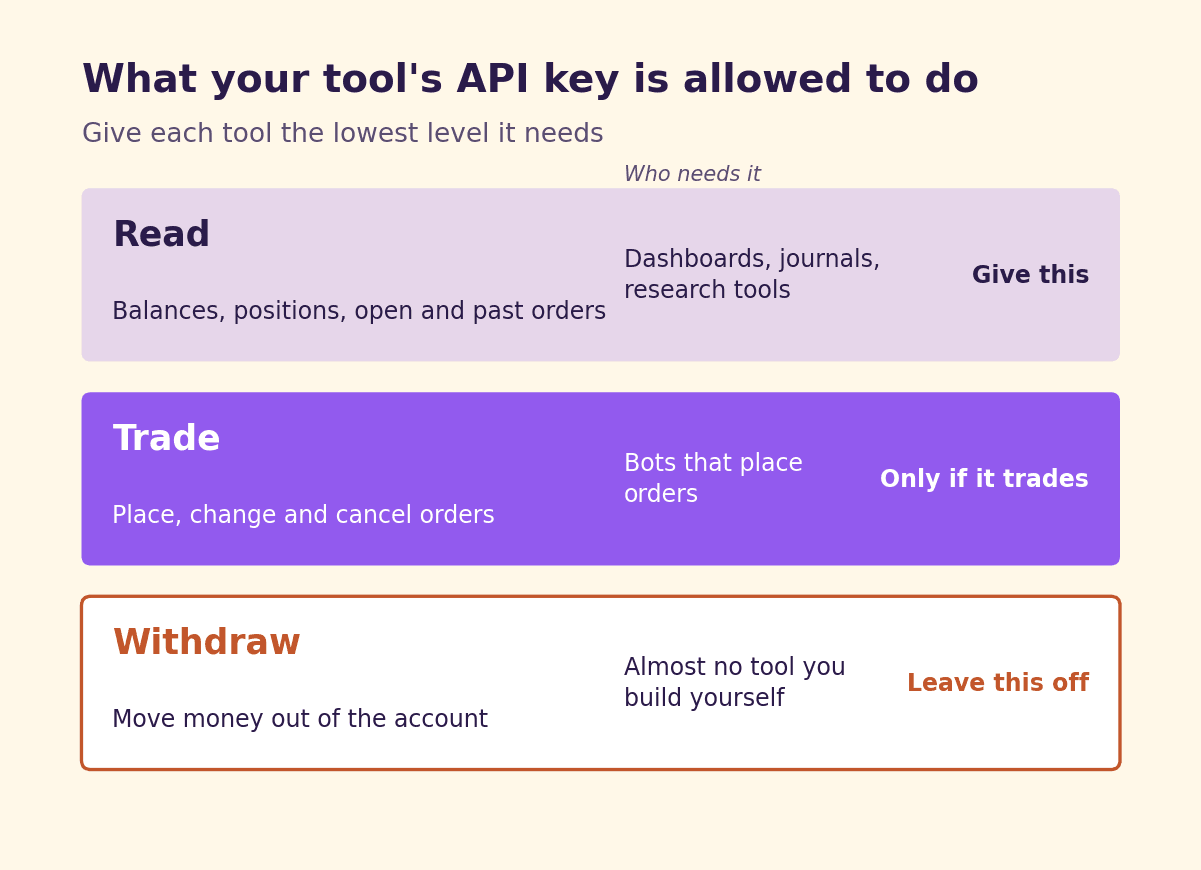
In practice, I'd sort every tool into one of three groups. A dashboard, a journal or a research tool only needs to read, so it should get a key that can read and nothing else. A bot that places orders needs to trade, but it still has no reason whatsoever to move money out of your account. A key that can withdraw is the one I'd simply never hand to anything I built myself, because a leaked trading key can do damage inside your account, while a leaked withdrawal key can take the money out of it. Where your broker offers it, lock the key to the IP address your tool runs from as well, which according to Kraken prevents almost all misuse even when the key does leak.
You can also let your code guard this for you. In our trading journal, a test fails as soon as an order function appears anywhere in the code, so the agent can't quietly add one later without that test going red.
Where your keys end up
The second question is where the key lives, and for many AI-built tools the honest answer is "in more places than you think". The coding agent might have written it straight into the code, it might sit in a .env file that got committed anyway, or it might be in the configuration of an MCP server, where GitGuardian found 24,008 secrets in public files. Then there are the places that have nothing to do with code at all, such as a chat with your assistant where you pasted the key to fix an error, or a screenshot you sent to a friend.
The rule I'd follow here is that a key which has ever been somewhere it shouldn't have been gets replaced with a new one, because deleting the file or the message doesn't undo the fact that it was out there. GitHub has blocked pushes that contain many known types of keys to public repositories by default since 2024, which helps, but it only recognises the key formats it knows, and it doesn't cover private repositories without a paid add-on.
Paper and live, kept apart
Many brokers give you a separate environment for paper trading, and Alpaca, for example, uses different keys and even a different web address for paper and live trading. That separation is worth keeping in your own tool as well, because a test that accidentally runs against your live account is an easy mistake to make when an agent is changing the code for you, so I'd store the two keys apart and have the tool show clearly which one it's using every time it starts.
Is your tool open to the whole internet?
As long as your tool runs on your own laptop, the number of people who can reach it is very small. Once you put it online, for example to check your dashboard from your phone, that changes completely. In March 2025, a researcher looked at 1,645 apps from the showcase of Lovable, a popular platform for building apps with AI, and found that 170 of them had a database that anyone could read or write without logging in, exposing things like email addresses, payment status and API keys. A later scan of more than 5,600 such apps by the security company Escape found more than 400 exposed secrets and 175 cases of personal data, including bank account numbers.
The quickest check is to open your tool in a private browser window without logging in and see what it shows you, and then to ask your agent which pages and database tables anyone could reach without an account. If neither of you is sure, I'd keep the tool on your own machine until you are.
When your tool reads something someone else wrote
A tool that reads news, emails or web pages has a weak spot that ordinary software doesn't have, because a language model can't reliably tell the difference between the text it's supposed to read and an instruction someone hid inside that text. OWASP puts this prompt injection at the top of its list of security risks for AI applications.
The most practical way to think about this comes from the developer Simon Willison, who describes a "lethal trifecta" of access to your private data, exposure to content from someone else, and a way to send something out. As soon as all three come together, a well-written piece of text can get the agent to send your data somewhere it shouldn't go. His advice is to avoid that combination altogether rather than count on a filter to catch every attack, because a filter that stops 95% of attacks is, in his words, "very much a failing grade".
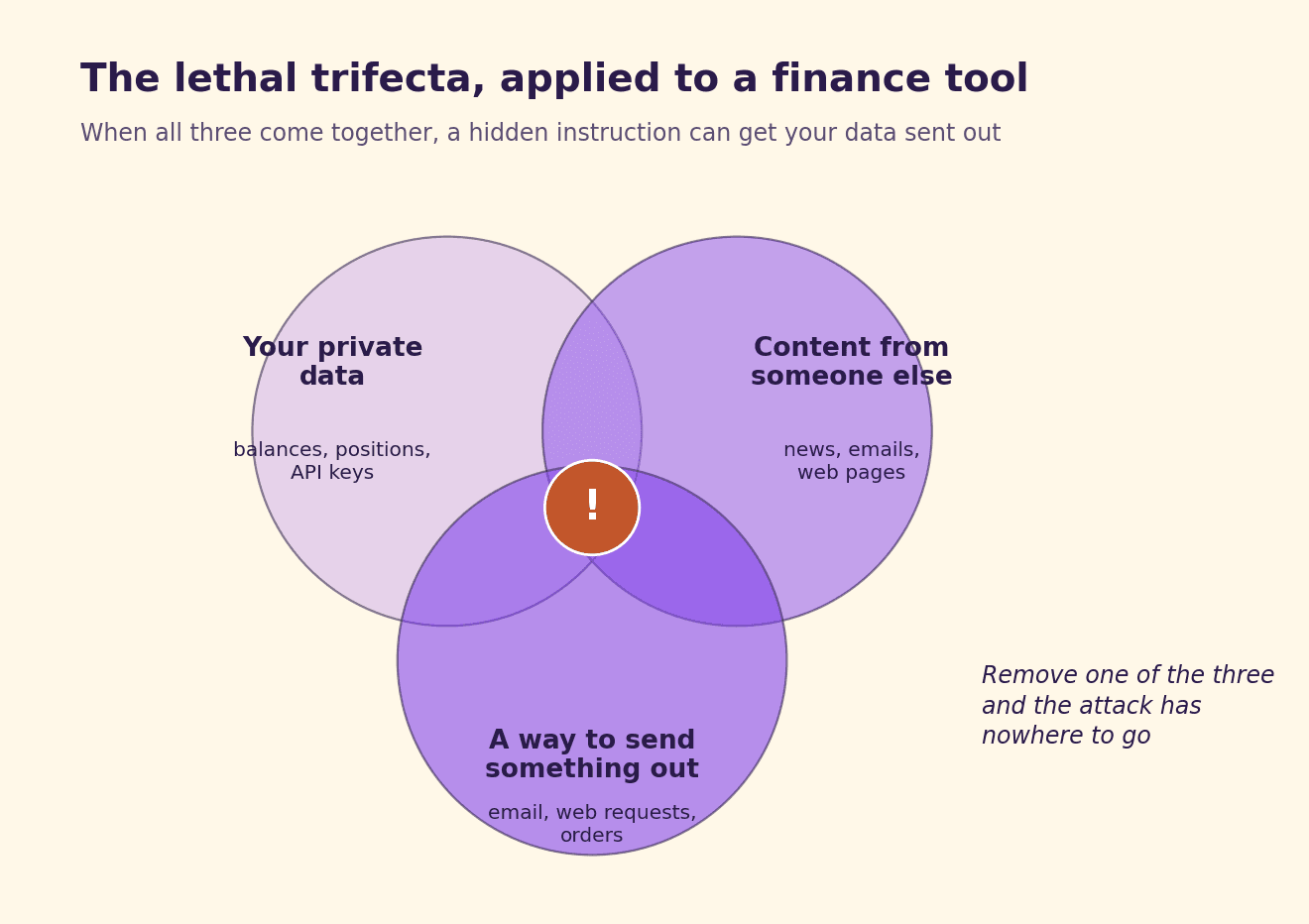
For a finance tool, that usually means making a choice. A tool that summarises the news for you shouldn't also be able to send emails or place orders, and a tool that places orders shouldn't be reading random web pages to decide what to do next.
The parts you didn't write
Your tool almost certainly also runs code that neither you nor your agent wrote. MCP servers are the clearest example, because in April 2025 Invariant Labs showed that the description of an MCP tool can contain instructions that the model reads but the user never sees, and in their demonstration a harmless-looking tool for adding two numbers got the agent to read the user's private SSH key. A server can also change its tools after you've already approved it, which they call a rug pull. Software packages work in a similar way, because in a study of 576,000 code samples from 16 language models, 19.7% of the packages the models recommended didn't exist, and since many of those invented names come back again and again, an attacker can register them and simply wait.
I'd only install MCP servers you can trace back to a real company or developer, and before installing a package your agent suggests, check that it actually exists and has been around for a while.
The agent that builds your tool needs limits too
It's easy to forget that the coding agent itself has access to everything in your project folder, including your keys. Claude Code, for example, lets you block it from reading files such as your .env, and its documentation says openly that this covers its own file tools and the commands it recognises, but not a script that opens the file by itself. For a real wall around those files, it points to its sandbox, which limits what any process can reach at the level of the operating system.
So while you're still building, I'd keep your live keys out of the agent's folder and only hand the finished tool its key at the very end.
The checklist
These are the questions I'd go through this week, in roughly this order.
- What can your key do? Read only for dashboards and journals, trading without withdrawals for bots, and never withdrawals.
- Is the key locked to your IP address, if your broker offers that?
- Has the key ever been in your code, a commit, a chat or a screenshot? If so, replace it.
- Are your paper and live keys stored apart, and does the tool show which one it's using?
- If the tool is online, what can someone see without logging in?
- Does the tool read content from others while also holding your data and being able to send something out? If so, remove one of the three.
- Where do your MCP servers and packages come from, and do the packages really exist?
- Can your coding agent read your live keys while it's building?
- How fast can you switch everything off? Revoke the key once as a test and see how long it takes.
That last one is the question people skip most often, and it's also the one you'll be happiest to have practised on the day something does go wrong.
This article is for information and education only and is not financial, legal or investment advice.
This article is information and commentary. It is not investment advice, not a personal recommendation and not investment research, it takes no account of your circumstances, and it must not be relied on as a reason to trade. Any figure shown is historical or simulated and is not an indication of future results.
Get the next piece the day it is published.
One email when a new report lands, nothing else.
Exact figures, sources, steps and terms behind this piece, written for the coding agent you point at it.
Quote freely with attribution: name the author, Hello Purple and the canonical URL, with the publication date, all of which are in the Markdown twin’s front matter. The twin is the reference text of the piece.
Read the appendix
Facts and figures
- Veracode 2025 GenAI Code Security Report (2025-07-30): 80 curated coding tasks, more than 100 LLMs, checked with static analysis; generated code introduced an OWASP Top 10 vulnerability in 45% of cases; security performance did not improve over time while syntactic correctness did.
- GitGuardian State of Secrets Sprawl 2026 (2025 data): about 29 million new hardcoded secrets in public GitHub commits in 2025, up 34% year on year; Claude Code co-authored commits leaked secrets at about 3.2% against a 1.5% baseline; 24,008 unique secrets found in MCP configuration files. Vendor data.
- Kraken API keys: separate permissions including Query Funds, Query Open Orders & Trades, Query Closed Orders & Trades, Create & Modify Orders, Cancel/Close Orders, Deposit Funds and Withdraw Funds; Kraken recommends minimum permissions, says an order-only key does not need Withdraw Funds, and says IP whitelisting prevents almost all key misuse even if the key is leaked.
- Alpaca: paper and live trading use separate API domains (paper-api.alpaca.markets and api.alpaca.markets) and separate credentials.
- GitHub: secret scanning push protection enabled by default for pushes to public repositories since early 2024; covers known token formats only.
- CVE-2025-48757 (Lovable): insufficient Supabase Row Level Security in generated sites through 2025-04-15 allowed unauthenticated read and write access to database tables; a scan of 1,645 showcase apps found 170 affected; reported 2025-03-21.
- Escape: scan of more than 5,600 publicly available apps built on vibe-coding platforms found more than 2,000 vulnerabilities, more than 400 exposed secrets and 175 instances of personal data, including IBANs.
- OWASP Top 10 for LLM Applications 2025: LLM01 Prompt Injection; LLM06 Excessive Agency.
- Simon Willison, "The lethal trifecta for AI agents" (2025-06-16): access to private data, exposure to untrusted content, ability to communicate externally; advice is to avoid combining all three.
- Invariant Labs (2025-04-01): tool poisoning hides instructions in MCP tool descriptions that the model sees and the user does not; demonstration read ~/.cursor/mcp.json and ~/.ssh/id_rsa; a rug pull changes a tool description after approval.
- Spracklen et al., USENIX Security 2025: 576,000 code samples from 16 LLMs; 19.7% of recommended packages did not exist; 205,474 unique hallucinated package names.
- Claude Code permissions documentation: Read and Edit deny rules apply to built-in file tools, recognised file commands in Bash and redirections, not to subprocesses that open files themselves; the sandbox gives OS-level enforcement.
Steps to reproduce
- List every API key the tool uses and check its permissions in the broker's key settings; reduce each to read, or to trade without withdrawal.
- Enable IP restriction on each key where the broker supports it.
- Search the code, commit history, MCP configuration, chats and screenshots for the key; replace any key found outside its intended store.
- Store paper and live keys separately and make the tool display which environment it uses at start-up.
- If the tool is online, open it in a private window without logging in and ask the coding agent to list every route and database table reachable without authentication.
- For each agent in the tool, check whether it combines private data, untrusted content and an outbound channel; remove one.
- Verify the source of every MCP server and the existence and age of every package the agent added.
- Keep live keys outside the coding agent's working folder during development, or enable the agent's sandbox.
- Revoke a key once as a test and record how long it takes.
Limits
Most figures come from security vendors and use different methods (static analysis, external scans, repository scans), so they are not directly comparable. API key permission names and options differ per broker and exchange; Kraken and Alpaca are examples, not recommendations. IP restriction is not offered everywhere and breaks when the IP address changes. GitHub push protection recognises known key formats only. Removing one leg of the lethal trifecta limits data exfiltration through prompt injection; it does not prevent every misuse. This checklist does not replace a professional security review.
Sources and links
- Veracode, GenAI Code Security Report press release (2025-07-30): https://www.veracode.com/press-release/ai-generated-code-poses-major-security-risks-in-nearly-half-of-all-development-tasks-veracode-research-reveals/
- GitGuardian, State of Secrets Sprawl 2026: https://gitguardian.com/state-of-secrets-sprawl-report-2026
- Kraken, API keys guide: https://docs.kraken.com/exchange/guides/rest/api-keys
- Alpaca, API key security best practices: https://alpaca.markets/learn/api-key-security-best-practices-for-alpaca-builders
- GitHub, Keeping secrets out of public repositories (2024): https://github.blog/news-insights/product-news/keeping-secrets-out-of-public-repositories/
- CVE-2025-48757: https://cvemon.intruder.io/cves/CVE-2025-48757
- Superblocks, Lovable vulnerability explained: https://www.superblocks.com/blog/lovable-rls-breach
- Escape, methodology of the vibe-coded apps scan: https://escape.tech/blog/methodology-how-we-discovered-vulnerabilities-apps-built-with-vibe-coding/
- OWASP Top 10 for LLM Applications: https://genai.owasp.org/llm-top-10/
- Simon Willison, The lethal trifecta for AI agents (2025-06-16): https://simonwillison.net/2025/Jun/16/the-lethal-trifecta/
- Invariant Labs, MCP tool poisoning attacks (2025-04-01): https://invariantlabs.ai/blog/mcp-security-notification-tool-poisoning-attacks
- Spracklen et al., We Have a Package for You! (arXiv 2406.10279): https://arxiv.org/abs/2406.10279
- Claude Code, permissions documentation: https://code.claude.com/docs/en/permissions
- Hello Purple, the self-updating trading journal: https://hello-purple.com/reports/self-updating-trading-journal/
Terms
- API key: a credential that lets software act on your account; its permissions decide what that software can do.
- IP restriction (whitelisting): a key setting that only accepts requests from listed internet addresses.
- Paper trading: a simulated account that uses fake money and separate keys.
- Secret: any password, key or token that grants access and must not be published.
- Row Level Security: a database setting that decides which rows each user may read or change.
- Prompt injection: text hidden in content an AI reads, written to change what the AI does.
- Lethal trifecta: the combination of private data, untrusted content and an outbound channel in one agent.
- MCP server: a program that gives an AI assistant tools through the Model Context Protocol.
- Tool poisoning: hidden instructions in an MCP tool's description.
- Slopsquatting: registering a package name that AI models invent, so that code which installs it pulls in the attacker's package.
About this piece
Hello Purple, the-map track, 2026. Written for people who trade or invest their own money and have built their own tools with a coding agent. Based on public research, vendor reports and documentation as of 2026-10-30. Hello Purple is published by Purple Technology; no Purple product is described in this piece.
Financial Market Analyst at Purple Technology. Holds a bachelor's degree in Finance and Insurance from HOGent, graduated with honours, and previously worked as an investment analyst at a family office. Spent two years in an investment club, analysing stocks and preparing pitches for the other members. Has traded his own account for five years across risk-premia harvesting, order flow trading and discretionary momentum swing setups, and built his own strategies on well-known concepts like open drives, inside days and open gaps. Writes here about AI in finance in practice, with a focus on trading and investing.